SQL Sync for DDEV: Drush-Style Database Sync for Any SSH Server

Anyone who has worked with Drupal knows this command:
drush sql-sync @prod @selfOne command, and the local site has a copy of the production database.
I use Drush a lot, so I wanted the same thing for my personal projects. They are Laravel, WordPress and plain PHP sites, and they live on all sorts of hosting: shared accounts, VPSs, dedicated boxes — a good number of them running cPanel, which itself runs on shared and dedicated hosting alike. What I had instead was the usual mix of phpMyAdmin exports and one-off scripts that I had to remember each time.
DDEV does have pull providers. The ready-made ones are for hosted platforms like Pantheon and Acquia, but the examples it ships also include an rsync one, for pulling a dump down from a plain server over SSH. I do not want to overstate the gap: that example works. But it is a starting point you adapt, not a finished tool. Every project needs its own provider file, written and kept up to date separately, and sanitize is on you. I kept missing the Drush shape: one aliases file, the same command in every project, and sanitize taken care of. So this add-on is that shape, packaged: ddev-sql-sync.
One thing to state up front: I designed this add-on, and it was built and tested with the help of an AI agent, Ryan (Muse), working under my direction. There is a bit more about that at the end.
Where I use it:
- Refreshing local data. I can bring a local site up to date with production content before I start work on it.
- Debugging with real data. I can reproduce a production issue locally, with user emails and passwords already scrubbed.
- Any server I can SSH into. Shared hosting, a VPS, a dedicated server, with or without cPanel — if it runs MySQL or MariaDB, it works. There is no platform account or API in between.
How it Works
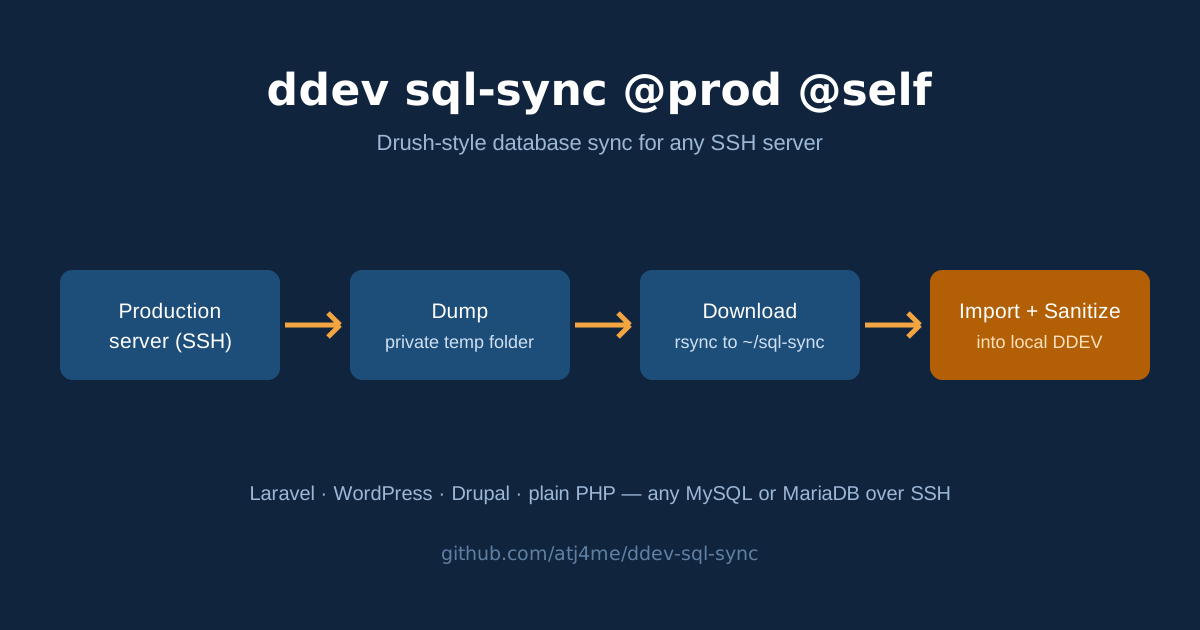
The configuration is one YAML file of named aliases, much like Drush site aliases. A run of ddev sql-sync @prod @self then does four things:
- Dump — SSH to the server and make a database dump in a private temp folder there.
- Download — rsync the dump to a local folder (by default
~/sql-sync), then delete the copy on the server. - Import —
ddev import-dbinto this project. You are asked to confirm first. The current local database is replaced. - Sanitize — scrub user emails and passwords in the local database. On by default.
Note the target in the command. cp, rsync, scp and Drush’s own sql-sync all take a source and a destination, so this one does too. @self is the only target it accepts; anything else is refused. The add-on only ever reads from the server, and having the target in the command keeps that in front of you.
Prerequisites
Two things to sort out first:
-
SSH from your own machine. The add-on is a host command. It runs
sshandrsyncon your computer, using your~/.ssh/configand your keys, the same way you would by hand. It does not useddev auth ssh, and nothing SSHes from inside the web container. So this has to work first:ssh your-server-alias 'echo ok'If that asks for a password, set up key login first (
ssh-copy-id). If the host uses a different SSH port, which is common on shared hosting (most cPanel accounts, for instance), put the port in the~/.ssh/configentry for that alias. -
A way to dump the database on the server. If the app has an export tool of its own, the add-on uses that (see Dump strategies below). Otherwise the server needs
mysqldump. You do not have to guess: the--dry-runcheck further down will tell you if it is missing.
You also need DDEV v1.24.10 or later.
Installation
-
Install the add-on:
ddev add-on get atj4me/ddev-sql-sync -
Restart DDEV:
ddev restart
Installing the add-on creates .ddev/sql-sync/aliases.yml from the example that ships with it, if you do not have one yet. Add-on updates never overwrite your aliases.yml, and removing the add-on does not remove it either.
Configuration: .ddev/sql-sync/aliases.yml
This file is the whole configuration:
local:
  dir: ~/sql-sync # where downloaded dumps are kept

prod:
  host: myserver # an ~/.ssh/config alias or a hostname
  user: deploy # optional; ssh target becomes user@host
  root: /var/www/example # the app's path on the server
  tmp: /tmp # optional; temp folder on the server
Define as many aliases as you like (prod, staging, and so on) and pick one per run: ddev sql-sync @staging @self.
Each alias needs two keys, host and root. The optional keys:
| Key | Purpose |
|---|---|
platform: | laravel, wordpress, drupal or php. Usually unset — see Platforms below. |
options: | Extra SSH options, e.g. options: -i ~/.ssh/prod_key. |
jump: | A jump host (bastion) passed to SSH as -J. Prefer ProxyJump in your ~/.ssh/config — that is the durable place; this key is for one-off syncs. |
dump: | A command on the server whose output is the dump. Replaces the dump strategies below; works for any platform. |
database: | Explicit database credentials, for setups where the app’s config cannot supply them (see below). |
sanitize: | Path, relative to the project root, to your own SQL file to sanitize with after import. |
Where the database credentials come from
Normally you do not configure any credentials at all. When it is time to dump, the add-on reads them from the app’s own config on the server: .env for Laravel, wp-config.php for WordPress, sites/default/settings.php for Drupal.
For setups where that cannot work — a managed database host, or credentials split across files — an alias can pin the values itself:
prod:
  # ...
  database:
    name: example_db
    username: example_user
    password: example_password
    host: 127.0.0.1 # from the app server's perspective
    port: 3306
Any field you leave out falls back to the app’s config, field by field. You can pin just the password, or just the host and port for an RDS-style endpoint.
Treat a filled-in
password:as a secret.aliases.ymlsits under.ddev/, which many projects gitignore — check yours — andchmod 600 .ddev/sql-sync/aliases.ymlis a good idea if you use this block. The password is passed to mysqldump through theMYSQL_PWDenvironment variable only, never as a command-line argument, and it is never printed.
Usage
ddev sql-sync @prod @self           # source, then target — like cp / rsync / drush sql-sync
ddev sql-sync @prod @self -y        # skip the confirmation prompt
ddev sql-sync @prod @self --dry-run # preflight checks only — nothing is dumped or imported| Flag | Meaning |
|---|---|
--sanitize / --no-sanitize | Sanitize after import (on by default), or skip it. Skipping prints a loud warning: the local database then holds real production emails and password hashes. |
--dump-dir=<path> | Where the dump is downloaded to (overrides local.dir). |
--no-dump | Do not make a new dump; fetch the dump file an earlier --no-sync run left on the server. It is verified against its completion marker before anything is imported. |
--no-sync | Only create the dump on the server and leave it there; do not download, import, or sanitize. |
--dry-run | Preflight only: check SSH, platform, dump strategy, credentials (the password is never shown), database size and disk space, then print the plan. Takes no dump, imports nothing, and writes nothing on the server. |
-y, --yes | Do not ask for confirmation. |
-h, --help | Show help. |
Downloaded dumps are saved as <dump-dir>/<alias>.sql — or <alias>.sql.gz, if the dump turns out to be gzipped — and kept after import, which is handy if you want to import the same dump again. They do contain production data, so delete them when you are done with them: rm ~/sql-sync/*.sql*.
Dump Strategies and Platforms
For each alias, the dump is made in one of these ways, in this order:
dump:override — if the alias sets one, it always wins.- The app’s own export tool, run on the server in the app root, if the platform has one and it is installed there. If it is missing, the next strategy is used instead of failing:
- WordPress →
wp db export(WP-CLI) - Drupal →
drush sql-dump - Laravel → there is no native data export (
schema:dumpis structure-only), so Laravel always uses strategy 3.
- WordPress →
mysqldump— with credentials resolved as described above.
The run tells you which strategy it used.
The platform is worked out per alias: the alias’s platform: key if you set one, else this project’s DDEV type from .ddev/config.yaml (the laravel and wordpress types map to themselves, and every Drupal variant — drupal7 through drupal11 — maps to drupal), else php. Some notes per platform:
- Laravel / any
.envapp — credentials come from<root>/.env, under the usual Laravel key names (DB_DATABASE,DB_USERNAME, and so on). One caution: Bedrock-style WordPress uses different key names in its.env(DB_NAME,DB_USER), so for a Bedrock site, pin at least the name and username in the alias’sdatabase:block. - WordPress (classic) — credentials come from the
DB_*defines in<root>/wp-config.php, or one level up, as WordPress allows. The table prefix is read from the config, so sites with a prefix sanitize properly. - PHP (generic) — DDEV’s generic
phptype, and the fallback when nothing else matches. No app export tool, so it always uses mysqldump. Credentials come from<root>/.envif there is one, merged under the alias’sdatabase:block — for a generic app, that block is the expected main source. There is no bundled sanitize: asanitize:file is honoured if you set one, otherwise the run reports that no sanitize ran. - Drupal — dump through Drush when it is available. Otherwise credentials are read from the default
$databasesentry insettings.php. That read is best-effort: a settings file that gets its credentials from the environment may not give them up, and then adump:override or a pinneddatabase:block is the way out. Asanitize:file on the alias, if set, takes precedence overdrush sql-sanitize.
Sanitize
Sanitize runs after the import, and only on the local database:
- Laravel — bundled SQL:
users.emailbecomesuser<id>@example.test,users.passwordbecomes a hash ofpassword,remember_tokenbecomesNULL. - WordPress — bundled SQL on the users table, using the site’s actual table prefix: email becomes
user<id>@example.test, password becomesMD5('password'), which WordPress accepts at login and rehashes on its own. - Drupal —
ddev drush sql-sanitizewhen the local project has Drush; otherwise asanitize:file from the alias; if neither exists, the run says so. - Any platform — a
sanitize:file set on the alias is always honoured.
If sanitize is switched on but nothing could actually be applied, the run ends with “completed WITHOUT sanitize” and a non-zero exit code. It does not report success and leave live production data sitting in your local database.
What Happens on the Server
Since this runs against production, here is everything a run does there:
- It reads the app’s config file to get the credentials.
- It creates one dump file in a subfolder of the alias’s temp folder —
/tmp/ddev-dumpsby default. The folder is mode 700 and the dump mode 600, so on a shared server the other accounts cannot read it. If a run fails partway, the partial dump is removed rather than left behind. - On success, it writes a small completion marker next to the dump with the dump’s exact size in bytes. The local side checks that size before trusting the file, including on a later
--no-dumprun, so a truncated dump is never imported as if it were whole. - After the download, it deletes the dump and the marker on the server. If the import itself then fails, the server copy is kept, and the run tells you how to retry with
--no-dump.
That is all. Nothing is written to the app or its database: no cache clears, no migrations, no restarts. Before dumping, the run also estimates the database size and stops if the temp filesystem has less free space than that, because a dump filling the disk is the one realistic way a sync could hurt a small server. If the size cannot be estimated, the run says the check was skipped instead of saying nothing.
Testing Safely
New server, or you would rather be careful? Work up in steps:
ddev sql-sync @prod @self --dry-run— preflight only, as above. You get a result per check, plus the plan, and then it stops.ddev sql-sync @prod @self --no-sync— a real dump, made on the server and left there. Nothing is downloaded or imported.ddev sql-sync @prod @self --no-dump— fetch that dump, verify it against its marker, import and sanitize.ddev sql-sync @prod @self— the full run.
Troubleshooting
- “mysqldump is not installed on this server” — the preflight found no
mysqldumpin the SSH session’s PATH and no usable app export tool. Install the MariaDB/MySQL client tools on the server, or give the alias adump:command that makes the dump another way. - Credentials look right but authentication fails — check for a stale
~/.my.cnfon the server, in the sync user’s home. A[client]password in that file silently overrides theMYSQL_PWDenvironment variable for MariaDB clients, this tool included. I ran into exactly this in my own testing. - The run asks for an SSH password or hangs — the add-on expects SSH without prompts. Test with
ssh your-server-alias 'echo ok'and fix your key setup first. - “unknown alias” — the name after
@has to match a top-level key inaliases.ymlexactly.
Uninstalling the Add-on
ddev add-on remove sql-syncThis removes the command and the files that came with it. Your aliases.yml and any downloaded dumps are left where they are — delete them yourself if you want them gone.
How This Add-on Was Made
My first instinct is usually a workaround with the tools I already know, and Tailscale and Drush have carried me through more situations than I can count. This one started the same way: a personal project needed its production database locally, and the sync had to suit my workflow. As noted at the top, I designed the add-on and an AI agent built and tested it under my direction. Before it was released, the code went through an independent read-only audit and an end-to-end rehearsal against a container standing in for a production server, and what those turned up was fixed. It is here in case it suits someone else’s workflow too.
Additional Resources
- ddev-sql-sync on GitHub: source, issues, and the full README.
- Releases: release notes for every version.
- DDEV add-ons: how add-ons work and how to write your own.
- Drush sql-sync: the command this add-on is modelled on.
I hope this helps anyone else who has wanted drush sql-sync for the sites they run outside Drupal. If you run into issues or have suggestions, feel free to open an issue on the GitHub repository.